For our upcoming SearchLove conference in London in October on the 15th and 16th, we are introducing a new kind of session: we plan to have up to four shorter (20 minute) sessions presented by newcomers. We anticipate that this will be perfect for people who’ve got some speaking experience on smaller stages / at meet-ups but who haven’t yet had a big-stage opportunity in front of hundreds of people.
Every time we put on a SearchLove show, we (led by our head of events, Lynsey) scour the industry for the best speakers we can find. We often invite back people who blow us away and wow our audience, but we also want to find speakers no-one has seen before. Sometimes we find great speakers who have deep experience in related fields who are underexposed to the search industry, but sometimes we want to be the ones who help people break out for the first time.
In addition to the long game of building partnerships with the great speakers of tomorrow, we believe that these shorter sessions with a little less pressure could end up bringing perspectives and viewpoints we can’t get from our more experienced speakers. Speaking experience often comes with general experience, and that often accompanies moves to management or the growth of the speakers’ own companies. One of the things we also want to see is hands-on advanced and actionable advice from practitioners who are doing the work every day.
We’re also hopeful that we can access a more diverse pool of speakers with different backgrounds and experiences. There are unfortunate barriers in place to getting some of the experience that we typically require and while we put a lot of effort into broadening our intake, we hope that this initiative can play a key role in building the pipeline. (You can tell we’re serious about building a safe, inclusive and welcoming environment for our speakers and delegates through the way we bake our code of conduct into our events, and our recent progress: in an industry with too many manels, SearchLove Boston 2018 was our first conference with >50% women speakers and had women appearing as the top-rated speaker and 3 of the top 5 speakers by overall rating.
We know that we will get a bunch of overconfident white men applying (yes, I see the irony in my writing that) but if that doesn’t describe you, I’d really encourage you to throw your hat in the ring.
What’s in it for you?
This should be the shortest path from knowing what you’re talking about to getting full speaking opportunities on the industry’s biggest stages. We have seen first hand the speed that you can move from presenting at a meet-up to local conferences to SearchLove, MozCon or Inbound. But up until now, most of the non-Distilled speakers who made it to the SearchLove stage did so after proving themselves at another conference.
Here’s the full package you’ll receive if you are successful (along with your 20 minutes on stage!):
1/2 day speaker training session at the Distilled London office with our team
Deck review and content call to bounce around your session ideas with me
VIP ticket to attend SearchLove London including attending the VIP dinner with all the other speakers the night before the conference
A nice bunch of Distilled and SearchLove swag
Although we hope to roll the scheme out to our US events if it’s successful, we want to give this opportunity to local folks, and so we"ll only be accepting pitches from applicants willing to travel to London for this particular conference. If successful, you will be responsible for your own travel and accommodation.
A note on the video requirement
You will note that the application form asks for a video. We debated whether to include this as a requirement and ultimately came down on the side of including it because by far the biggest limitation we typically have with less experienced speakers’ pitches is an inability to judge how they’ll perform on stage when they don’t have a ton of speaking experience and professional on-stage video. We hope that this is the most inclusive way of achieving this. We’re trying to avoid the too-high hurdle of requiring professional footage or big-event experience and this is something everyone can put together.
We are not expecting you to put together a professionally-lit and shot promo video. We want to see your enthusiasm, public speaking capability, and maybe a bit of your depth of knowledge. A selfie video shot on a mobile phone can totally do the job, but think about how you are going to stand out from the crowd and show us what we need to see. Once you have recorded the video upload it to a hosting platform such as Google Drive, Wistia, YouTube or Vimeo and share the URL in your application form.
In order to avoid asking you to do something I wouldn’t be prepared to do myself, I’ve recorded a short pitch myself. You can see that it’s shot on a phone, and didn’t use any editing:
A personal note
I’ve seen in my own career how powerful it has been to get better at public speaking and also the benefits of appearing on bigger stages. I’ve been lucky enough to get enough of a start at our own events to bootstrap my way to bigger opportunities. I remember the 20 or so people who paid about a tenner each to come to our first meet-up, but now we have built up a support and coaching capability within Distilled that has helped members of our team go from their first speaking opportunity to highly-rated SearchLove sessions in a matter of months. Now I want to find ways to get more people access to the same opportunities.
I would strongly encourage you to think about the actual requirements. Don’t fall prey to imposter syndrome: are there things you are passionate about, where you have deep hands-on knowledge, and where you can teach even an experienced audience new things? If so, don’t sweat your speaking experience - let us be the judge of potential and get your application in.
How to apply
You’ll need to tell us:
Why you’d like to speak at SearchLove
What your speaking experience looks like so far (remember we are specifically not looking for super-experienced speakers)
What topic you’d like to talk about - the more specific and actionable a topic you can describe, the better
Remember, the closing date for applications is 18th July 2018
And you’ll need to send us a short video as I described above!
Banner ads have been around for a very long time (check out the first one, from 1994). But that doesn’t mean we’ve solved all their problems. Display ads have lower click-through rates than text ads. it can be arduous to create different sizes for different placements; and historically, if you wanted to create something dynamic, you were limited to clunky and non-secure Flash elements.
Public perception hasn’t quite kept up with technology. HTML5 has been a glorious addition to the banner ad game, and strong HTML5 ads have been shown to increase click-through rates substantially when compared to static banner ads—to the tune of 267%, according to one Adform study. Compare an HTML5 ad to a standard static ad, and it’s easy to see why you get that uptick in performance:
They move!
Today, we’re going to give you the lowdown on HTML5 ads. We’ll discuss what they are and how to make them; show you some ways you can shoot to achieve those massive increased click-through rates; and show you examples of some effective HTML5 ads in action.
Let’s get into it!
What Are HTML5 Ads?
HTML5 is the latest iteration of HTML—one of the markup languages browsers use to present content. HTML5 is the first version of HTML that allows developers to write video, audio, and others animations directly into the source code of a page—thus eliminating the need for plugins like Flash.
HTML5 ads are at once more attractive to click on and less intrusive to look at—because they live within the page, they’re more subtle, more elegant, and not quite so interstitial-y.
The big draw, as mentioned above, is that HTML5 ads include thumb-stopping motion elements like videos and gifs. Part of banner ad fatigue comes from an inability to discern the static elements on the page from the static elements in your ad. HTML5 ads demand views and clicks because they stand out from the rest of your on-page content.
Aside from traditional motion elements, HTML5 also supports 3D and interactive (read: the user can play around with it by touching or clicking on it) ad design. They run perfectly within native apps, and can be created to display responsively in all placements, on any device (something Flash ads could not do)—thus eliminating the need to create ads with multiple sets of specs for multiple placements.
How to Make HTML5 Ads
Google announced in 2016 that all Display ads would be served in the HTML5 format, and that Flash ads would be discontinued. This announcement was met with a bit of concern—mostly from campaign managers concerned with their ability to produce code-based ads, quickly and in-house. Flash ads were a security issue, sure; and not all devices could run them; but the alternative seemed like more work, and less output.
Luckily, you don’t need to be a full stack developer—or even be fluent in HTML5—to create an HTML5 ad. There are dozens of tools—Google Web Designer, Bannersnack, Flexitive, etc.—that allow marketers with limited knowledge of web-based code to create dazzling and click-worthy HTML5 ads.
Some of these special products—take, er, WordStream Advisor—allow you to skip the creation process nearly altogether. Merely enter your website or product page’s URL and some relevant ad copy. Advisor harvests the best images from your site or web page for ad creative; harvests your logo and company colors; then automatically generates HTML5 ads in the seven most common display ad sizes.
There are several options at your disposal when if you want to pump out in in-house HTML5 banner on the fly. If you’re still considering creating one from scratch, check out this great workshop from DoubleClick. You"ll need to have a strong facility with HTML5; you should also know that your ad will need to be SSL compliant.
HTML5 Ad Examples
It’s quite possible you’re still on the fence about creating HTML5 ads. Perhaps you need to see them in action to believe in their efficacy. We have you covered. To pique your inspiration, we’re going to show you three ways you can create HTML5 ads that give you a chance at drastically increasing click-through rates. We’ll show an example for each, and discuss why each ad is effective in utilizing the ascribed tactic.
Let’s look at some ads.
1. Make it expansive, not intrusive
One of the best parts about using code to write an ad is that you can essentially make it as expansive as you want. An HTML5 ad is like a webpage within a webpage; accordingly, you can customize it so users have immersive brand experiences without ever leaving the page on which they see your ad. Take this ad for Major League Soccer by Undertone:
This ad speaks to the “flashy but not intrusive” modus operandi I discussed earlier. The bright and dynamic create, when you first open the page, is transparent—this ad looks like a part of the page viewing experience; not something “extra” that’s impeding the user from accessing his or her content. And, if the opening creating is intrusive, it’s gone in a flash—the ad changes size and retreats to the corner of the page, where it’s hardly bothersome, but definitely still present.
From there, if the user’s intrigue is piqued, she runs her cursor or finger over the minified ad creative and clicks/presses. Doing so opens an expansive chamber of highlights which allows the user to either revel in a Michael Bradley give-and-go, flip through to the next highlight, or click “View Schedule” to see when the next game near them is taking place. If you’re a small business, you can think of this like a lead for one of your brick-and-mortars.
Expansive, but not intrusive is possible; and if you accomplish it, you won’t have to accost users for clicks—they’ll click through on their own volition.
2. Put your products in motion
Flashing imagery is great; but if you can animate your products without using video, you’ll have a streamlined ad that doesn’t sacrifice performance for slick aesthetic. Take this ad from Jeep:
In quick succession, Jeep uses HTML5 run through three panels advertising one product feature—with selective copy for each panel—before the product itself virtually drives onto the page. When you run your cursor over the last still shot, the “Renegade Details” call-to-action, which brings users to a Jeep landing page, is the final part of the ad that moves—an animation which basically tells the users how to interact with the ad without being overly pushy about it.
The notable thing here, though, is the way Jeep puts its product in motion. Much like an interactive web page that reveals information as you scroll, the animation is accomplished without video, so there’s no need to embed any cumbersome files to achieve the desired effect. And, unlike a traditional gif, the ad plays through once and is done (we made it into a gif, so you won’t see that action here)—so, if the user doesn’t click on the first try, your ad will not continue to invade his eye space with its flashiness.
Leveraging this kind of animation is a great way to show your products performing in their natural habitats while maintaining fully optimized and succinct ads.
3. Gamify your promotion
Excuse us for the language flip flop here, but this HTML5 ad Revenue Engineers created for online gaming company NordicBet was too good not to include:
What better brand to gamify an ad than an online gaming brand? You’ll see gamified ads in a number of formats—completing a crossword puzzle, making an animated basket, shooting an animated target—but the result is always the same: the user is enticed to click through to a landing page by playing the game. How can you resist playing a little impromptu roulette?
This ad is particularly effective because it doesn’t directly send users to a landing page after they spin the roulette wheel. Rather, it displays the “prize”—a link to a registration form—in a widget on the left with the call-to-action, “Receive Your Gift.” From there, users are led to a registration page complete with a form field in which they fill in their information. This is another form of permission marketing that falls in line with the non-intrusive examples we’ve already discussed.
Gamifying your ads with HTML5 is a great way to entice clicks; and this ad shows that you don’t need to be intrusive or spammy to do so.
Making the Most of Your HTML5 Ads
Feel a knowledge gap between your understanding of HTML5 ads and the level of creative design achieved in the examples we discussed? Don’t sweat it! HTML5 ads are now easier to create than ever; and accessing one of above-mentioned tools—like a free trial of WordStream Advisor—will put you on the fast track to HTML5 ad success.
I wish I knew earlier about this Google update! is something many site owners or marketers say on a daily basis. Moreover, it would be heaven on earth if we also knew how all those Google algorithm changes, be they official or unnamed updates, should be dealt with.
Most times, we get to see how rankings fluctuate, traffic drops, and still, we don’t know what to do. What’s more, we always think it’s us who made a mistake and, therefore, got downgraded. This blog post will both prove you’re wrong and agree with you. Plus, we’ll teach you what every change Google made so far in 2018 is doing to your site and how you can improve your marketing and SEO moves.
After a year like 2017 with significant algorithm changes and updates, Google doesn’t seem to want to settle down. Danny Sullivan, the officially-appointed ombudsman from Google, made it clear that they do various minor updates daily plus some more serious ones during the year: We do some type of focused update nearly daily. A broad core algorithm update happens several times per year.
Those would be focused, yes. We also have lots of updates focused on specific little things each day that go into the core algorithm. This is a broader general change to the core algorithm.
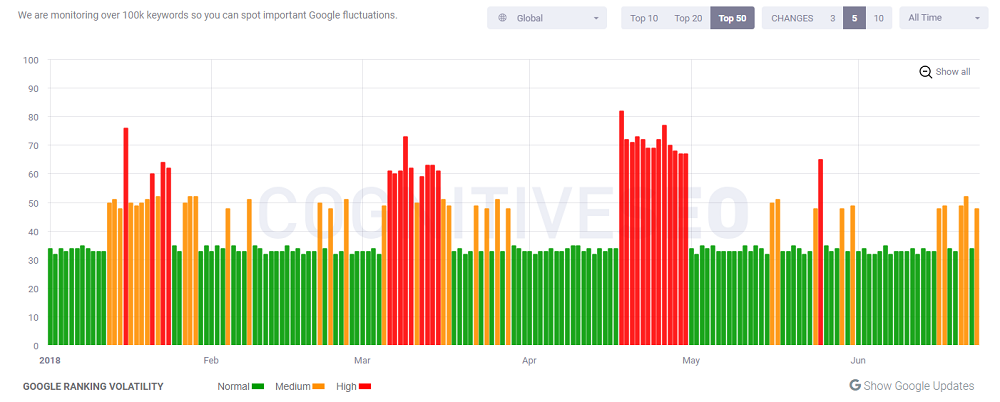
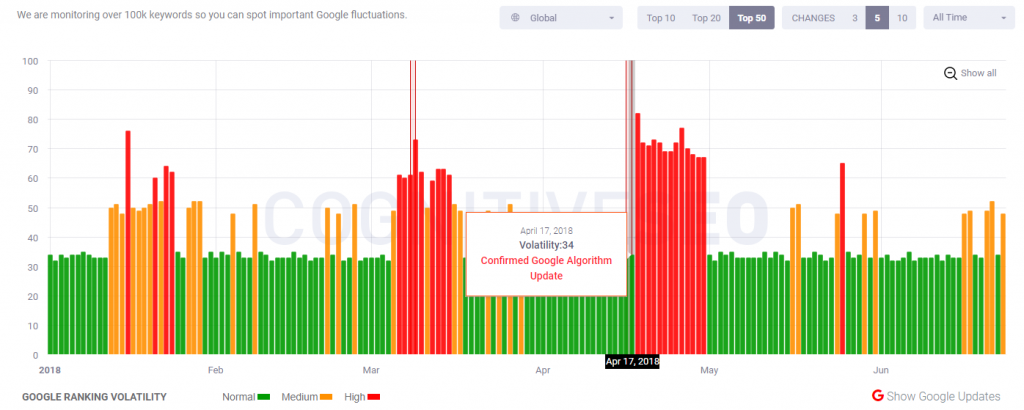
Guess this is how we could explain the hectic fluctuations in various Google algorithm monitoring tools. Webmaster and marketers alike often felt overwhelmed by the density and frequency of these ranking fluctuations and tried to interpret their activity, correlating their analysis and findings, and reaching a conclusion or providing an educated guess until Google would have officially confirmed them.
Screenshot taken from cognitiveseo.com/signals
Google likes messing around with people’s website traffic and site owners’ feelings – it sort of gives people mixed feelings regarding Google: both love and hate.
Many updates or changes in the way Google’s algorithm works is given by an interesting paradigm skillful webmasters know how to read. And that is the one provided by Barry Schwartz, the update guru of our digital marketing world:
When you have both signals, SEO chatter, and tools start lighting up, it is a good sign something major changed in the core ranking algorithm with Google search.
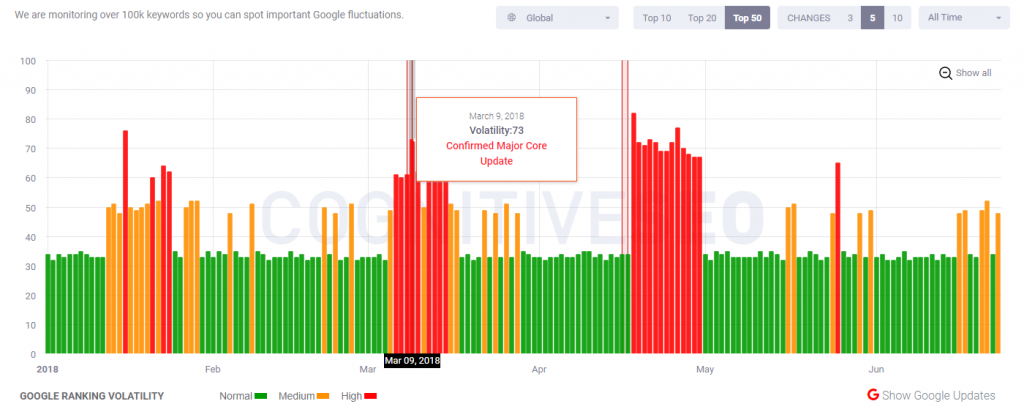
The 2018 updates pace is pretty aggressive, one might say, while March seems to have been the busiest month in terms of changes and ranking fluctuations. We’re not talking officially announced updates here, but only the SERPs activity as seen in forums and Google algorithm updates tracking tools.
Talking about Google-confirmed updates, it’s quite seldom for Google to officially confirm updates; it only happens several times a year. As a result, many updates that impacted websites across the world wide web might not be named and talked about as much as those regarded as significant by the Googlers. A fit example would be the March 7 one, widely known as a core algorithm update meant to reward “the under-rewarded sites”, as some webmasters would say. It has greatly impacted traffic and rankings while also needing a longer time span than usual.
The specifics of Google’s algorithm will always remain under wraps.
However, even when Google does give official statements about one update or another, they are quite evasive when it comes to confirming or guide users through. Maybe that’s why Barry Schwartz often says: “The answer, according to Google, is really nothing”.
Whenever site owners or fellow marketers want to dig more into what it looks like being an algorithm change, they turn to Barry Schwartz, as the go-to high-quality source regarding monitoring, researching, analyzing, and dissecting Google both confirmed and unconfirmed updates. Even though Barry’s posts often start as being speculative, they’re nonetheless worth checking them out and following him as they usually get confirmed later on either by fellow webmasters or by the Google team itself.
Either way, be the update Google-confirmed or unconfirmed, bearing a name or not, impacting websites over a shorter or longer period of time, it’s clear that there are fluctuations and while some sites might see drops in traffic, others might notice gains. As a consequence, both the lucky and the unfortunate sites should neither rub their gain in, nor lose confidence, but stick to building great content that makes searcher want to return to your page.
There’s no “fix” for pages that may perform less well other than to remain focused on building great content. Over time, it may be that your content may rise relative to other pages.
Without further ado, we shall talk about the 2018 Google updates that happened so far, focusing on those that were Google or webmasters-backed and already influenced the traffic and ranking flow of many websites.
2. Offering a Very Slow Experience Will Get Websites a Downgrade in Rankings
This update happened in the first month of 2018. Usually, December comes with a good share of inactivity, but this last December 2017 proved to be quite busy, were we to look at all the updates that have rambled on the Google streets: the Google-confirmed Maccabees updates that made a target out of some celebrity sites as well, knowledge graph updates, SEO starter guide update, extended meta description space, rich results testing tool new release and many more.
Mobile Page Speed as a Ranking Factor source: seroundtable,com
Getting back to our sheep, January 18 was marked by a Google-official announcement that regarded a page speed update scheduled to come into effect this July (we’d better hurry and make the right changes to our site, don’t we?). Google said this is a new ranking algorithm designed to lower the SERP position of some mobile pages that deliver a really slow experience to the end user.
Therefore, here we have it: a brand new, officially-announced Google ranking algorithm: page speed. Starting July 2018, page speed will be a ranking factor for all mobile searches.
Slow mobile pages that will get hit by this update will most likely not be notified in the Google Search Console given that this is an algorithmic thing, not a manual action. The good news, though, is that Google forecasted their actions to hit only a small percentage of pages presenting the slowest loading time and therefore a handful of queries. Schwartz, too, thinks this update is not very disruptive given that a page would have to be super slow to really get hit by this major update.
To be clear, there is no ranking boost for being fast, just a downgrade for being really slow.
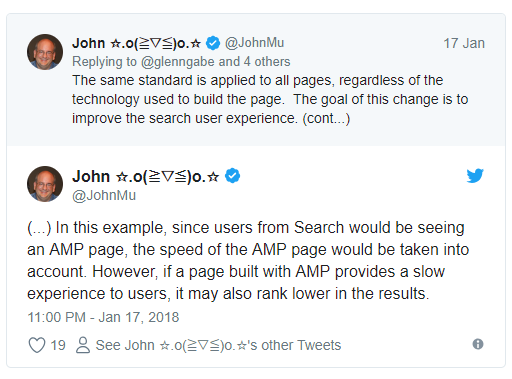
Apart from what we’ve previously said above – that it won’t impact the traffic and rankings lest you provide (at least) a reasonably satisfactory and fast experience to your users (which comes pretty obvious),- some webmasters raised a question: what comes first – canonical URL or AMP URL? This comes after many started worrying on how big of an impact will this update cause on their sites.
If a page’s canonical page is very slow but the AMP URL is very fast, will Google use the AMP or the mobile URL for measuring speed and ranking the page? Although, in theory, Google uses the canonical URL regardless whether there’s a desktop or mobile page involved and they have an AMP URL, Google confirmed that since the AMP URL is provided and is mega-fast, then no downgrade in rankings will take place. Berry’s answer is this:
The answer is AMP for speed will be what Google uses for this algorithm, not your canonical URL because that is what is being served. But for other signals, like content, links, etc, Google will use the canonical mobile URL. Confused? Yeah, thought so.”
What’s more, many Google users confuse this new speed ranking update with the Mobile-First Indexing update – they’re independent from one another, so don’t mingle them.
Last but not least, this January/July major ranking update will not boost the rankings of those pages that are fast, but only downgrade those that are extremely slow.
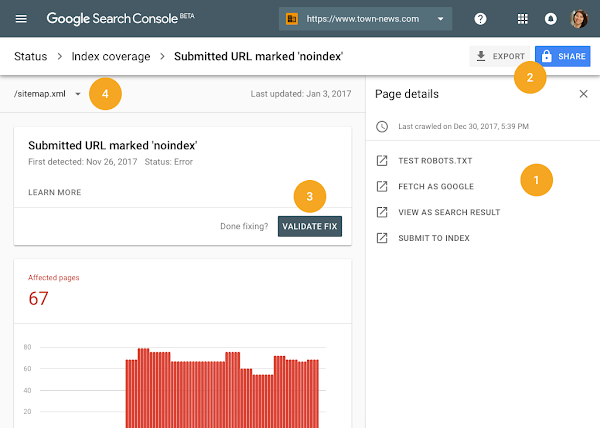
3. A Search Console Year-Plus of Data Adding
This update seemed to drive people crazy after Google: digital marketers and webmasters alike were very happy to learn that starting on January 8, the search giant released a new version of their Search Console with 16 months of stored data.
It"s here! Google officially announces the new Google Search Console: "We are now starting to release this beta version to all users of Search Console" with many updates including 16 months of data in Search Performance – Thanks @googlewmchttps://t.co/W0DNDFexxupic.twitter.com/mCPV8EvaMz
Today"s Search Console launch is the start in the biggest revamp of this tool in 12+ years. Excited to get your feedback on it! https://t.co/2VS8faUHLl
Besides Google Search Console Beta getting live for everyone with 16 months of stored data in the Search Performance report, Google also added various enticing new features to this version, such as an updated Index Coverage report (alerting you when bumping into new issues and helping you monitor their behavior), and a changed AMP status and Job Posting report.
How this Google update impacts you
Everybody can now understand how to optimize their site for Google, given how simple everything is (or at least it seems). In addition, having an extended period of data storage, you can now deploy more in-depth analysis of long-term trends that might impact more than one year. You will be able to work with really actionable data and make a wiser decision regarding your website and the overall user experience.
source: webmasters.googleblog.com
Also very important is the fact that the Google team intends to make this Google Search Console updating process a long-term one, hence they will continue adding new features and changes to their version. As a consequence, the Google team is asking for continued feedback – after all, how do you think the new GSC version got launched?
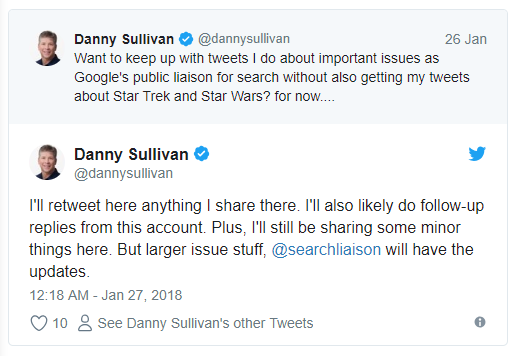
4. A Google-Backed Twitter Account Meant Solely for Search News
Danny Sullivan, Google’s public search liaison, decided to create a brand new Twitter profile meant to inform, guide, explain, and be in contact with all Googlers and users and announced it on January 26. Most of us already got those from following Danny’s profile but he found it more suitable to deliver messages regarding Google search on an entirely new profile and spare his following of Star Wars and Star Trek tweets, should they be interested mostly in the search side.
How this Google update impacts you
While this isn’t really a Google algorithm or ranking update, it still counts as a smart move meant to benefit all of the Google fans out there. I myself am quite thankful for this twist of events and seek to follow the Google SearchLiaison profile as closely as possible.
Why, you might wonder. Well, simply put, as Berry Schwartz is the primary source to check when it comes to Google updates in general, such is the new Google SearchLiaison profile the go-to source of information when it comes to every search-related thing, explanation, debate, or piece of news.
5. Switching from HTTP to HTTPS gets mandatory
This security-centric turn comes to prove once again the Google really cares about the user experience and trust websites provide to their visitors. Similar to the page speed update mentioned earlier, Google announced on February 9 that starting July 2018, websites should have an SSL addition to their site and provide an HTTPS-backed experience to their users, or else they’ll be punished.
source: searchenginejournal.com
How this Google update impacts you
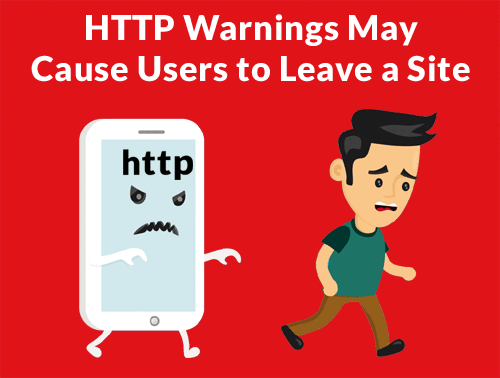
This HTTP-to-HTTPS issue is twofold: first, it’s for your own good and safety to use HTTPS instead of HTTP (“S” actually comes from “security”), two, Google will straightforwardly warn your visitors that your website is not safe browsing, leading to a pretty high bounce rate.
source: searchenginejournal.com
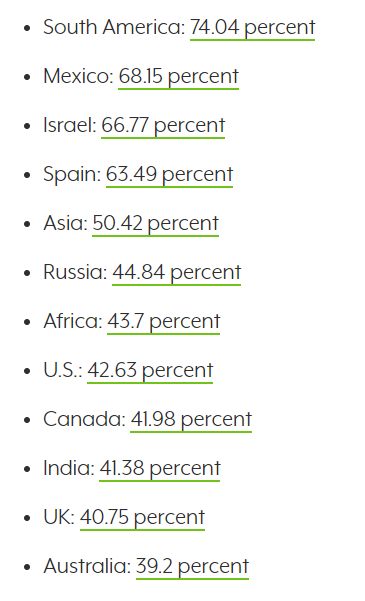
Given that Chrome holds a good browser version market share of 50% worldwide, we can say this update will impact many web owners. Therefore having a protruding notice in the Omnibox warning users that your website is “Not secure”, might increase bounce rate and take a toll on advertising impressions, affiliate links, and e-commerce overall sales. Here’s a list pointing out how many Chrome users there are and the impact level this update might have on various regions and countries, should website not switch to HTPPS.
source: searchenginejournal.com
Switching to HTTPS might be a bit difficult but it pays off. Most web hosting providers already provide this service for free or manage to give you HTTPS certificates at a rather low cost. So you have no excuse postponing this as money shouldn’t really be a problem.
6. “People Also Search For” Box
This Google change got live on February 13 and got fully implemented on desktop search already. Somehow, it’s similar to “people also ask” section except that this one directs people to other SERPs.
The new look is one search refinement meant to benefit organic results. Should you not qualify for a keyword entered in a search query, Google could lead visitors to your site when offering them variations of the first query. Or the other way around: if you focused on optimizing your page content and used both short and long keywords that might answer to a vast array of queries, you might appear twice in SERPs.
Google showing "People also search for" suggestions when we click through to a result and then go back. @JohnMu has said before that click data doesn"t affect rankings, but this suggests it"s at least monitored. Seen this before @rustybrick@randfish? #SEOpic.twitter.com/65hwz6jIxI
Starting February 19 this year, Chrome v64 cuts off unnecessary tails and the end of an URL when sharing it using the URL streaming “Share” in Chrome.
Berry Schwartz had a feeling that this new feature is tied to the canonical page URL. AMP has similar sharing features in order to deliver an easy-to-use and relevant URL.
How this Google update impacts you
Besides the impact we’ve mentioned above, the one with using and delivering a usable URL, there are two more consequences to this update.
On one hand, having the original URL trimmed when shared could be a little annoying, given that when it opens the page, it would load only the top of the page and lose the specific location it had when attached to, say, the anchor text.
On the other hand, who knows, maybe this feature will become really useful at some point in the future.
8. Search Console Crawl Limits Changed
One major update from Google happened on February 19 when the giant search engine radically changed the Search Console crawl limits due to spam and abuse.
Although there’s only a small percent who could abuse the system, it happened nonetheless and the team had to take action.
Before: Crawl only this URL submits only the selected URL to the Google for re-crawling. You can submit up to 500 individual URLs in this way within a 30 day period.
After: Crawl only this URL submits only the selected URL to the Google for re-crawling. You can submit up to 10 individual URLs per day.
Google Search Console also changed numbers here:
Before: Select Crawl this URL and its direct links to submit the URL as well as all the other pages that URL links to directly for re-crawling. You can submit up to 10 requests of this kind within a 30 day period.
After: Select & Crawl this URL and its direct links to submit the URL as well as all the other pages that URL links to directly for re-crawling. You can submit up to 2 of these site recrawl requests per day.
How this Google update impacts you
Barry Schwartz thinks this update might not be such a big deal to white-hat SEOs who don’t use this tool so often, given that a submission for indexation normally happens on a limited basis. But it might block some spam and unnatural activity from black-hat users.
9. Mobile-First Indexing
This Google update birth story is quite a soap opera. Once upon a February 22 day, webmasters and digital marketers alike gave a shoutout to a big announcement Google made at PubCon regarding a new ranking algorithm. Gary Illyes from Google announced onstage that the search engine webmaster team intends to roll the mobile-first index for more sites in the following weeks.
Announcement – In the next month and a half or so, Google is moving a LOT of sites to mobile first.@methode#Pubcon
The mobile-first indexing update didn’t come into effect until around March 26, as John Mueller didn’t give an exact date regarding the full start. Those monitoring fluctuations in Google rankings and traffic couldn’t tell either when exactly this updated started given the quite lengthy period of activity. What’s more, it almost gone completely unnoticed as there were few to no sites to signal their new ranking position from which to determine whether they were hit by this update or not.
How this Google update impacts you
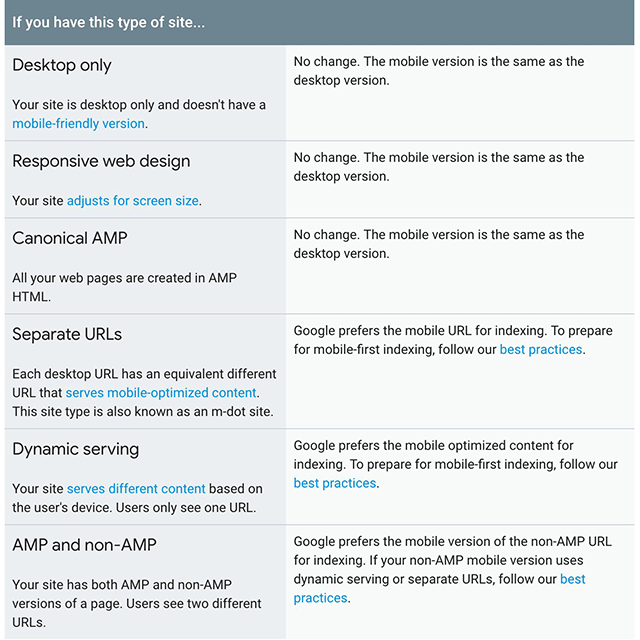
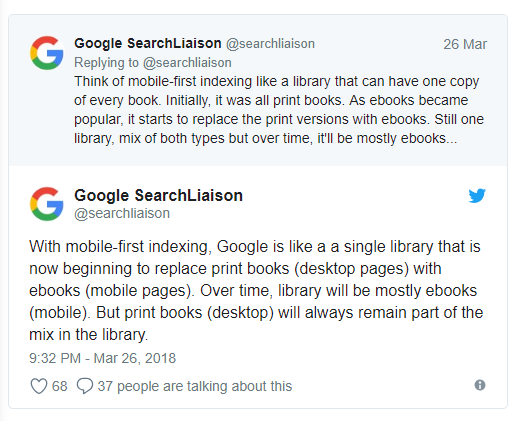
To best explain this update and what it does to your site, we could say that mobile-first indexing points out to Google’s attempt at indexing and ranking your website from a mobile point-of-view, when applicable. That is, should you have a mobile-friendly website, Google would index and rank your mobile version first. When I said “when applicable” it meant that Google will treat the world wide web this way only when bumping into sites that follow the best practices required by mobile-first indexing, therefore wouldn’t impact the other websites that didn’t check this aspect on their list. At least for now.
We evaluate each site individually on its readiness for mobile-first indexing based on the best practices and transition the site when the site is ready.
Regardless if your website is ready from a mobile-friendliness standpoint or not, optimizing and having mobile-friendly content is still relevant in marketing strategies that seek to make the website perform better in SERPs. Given there is a vast array of ranking signals that may influence your position in search, you might deliver content that is not necessarily mobile-friendly or is slow-loading. Having said this, optimizing your website for mobile would set your marketing strategy on fire, so you should definitely not postpone it.
N.B.: This update is mobile-first indexing, not mobile first index, where the primary index is still the desktop one, this one only being added to the core one.
10. Multifaceted Featured Snippets
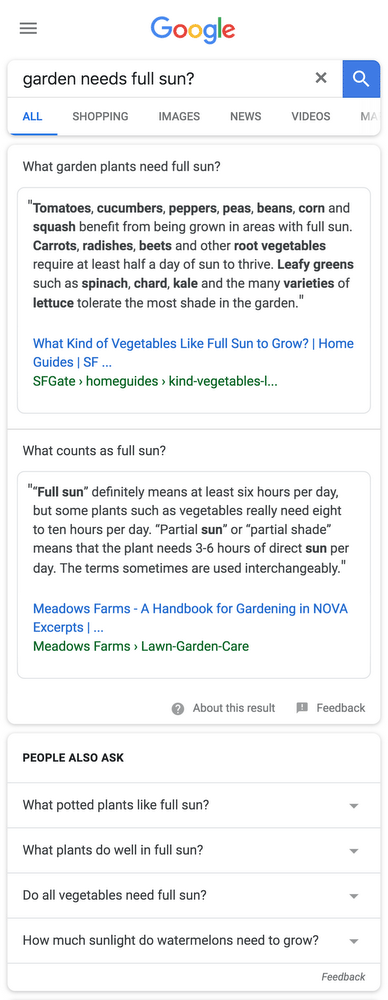
A new form of featured snippets was released on March 1 and it’s meant to answer queries that might be driven by more than one need and search intent.
Last month, we shared how Google would be displaying more than one featured snippet, when deemed useful. This is now rolling out live on mobile and will eventually come to desktop over time. More here: https://t.co/b2u4T9RvUWpic.twitter.com/ENJFa8ppkE
Google said they intend to provide more than one featured snippet for queries that might serve or have several potential intentions or purposes associated. This is one more step forward in what Google is trying to better understand the users and update it’s AI algorithm to deliver the best and the most satisfactory result possible.
How this Google update impacts you
Having a Google update such as multifaceted featured snippets is great news for both site owners and content marketers. This means that more sites will get the chance to be featured on position 0 in SERPs.
Site owners will have a double shot at ranking high in search while content marketers’ efforts of optimizing their content in order to be featured up there, will finally be rewarded.
On the other hand though, I sense this update might be a bit nagging to the user, given that this will only get the page more crowded than it already is.
11. The Relevancy Update
On March 9, there were some unnamed updates, yet online marketers knew how to interpret them and realize how big it was. while inquiring Google webmasters. John Mueller from Google confirmed in a Webmasters Hangout that these updates had to relevancy:
The updates that we made are more about relevance where we’re trying to figure out which sites relevant for certain queries and and not so much quality overall. It doesn’t means its a bad sign, we may just be finding that your site isn’t relevant for these particular queries.
Marie Haynes and her team investigates several site that got hit on March 9 and noticed similarities among most of them. Many of the victims were relatively big brand who lost rankings on their articles, which , on a closer look, showed signs of duplicate content in regard to other sites’ content. This clearly pointed out the fact that Google intends to sift sites that don’t raise up to the standard of providing helpful, useful, and unique content on their pages.
This is not an update pointing to who is bad and who is good – but they rather seek to refine their answers to people’s queries – hence, they want to give the good answer not just the one that ranks for it.
Seeing a drop around March 9 might show you were hit by this relevancy update. Getting downgraded doesn’t necessarily mean that your content is awful, but because Google saw one or more of your competitors being more qualitative than you.
Should you start optimizing your content and trying to fix everything so to see results as soon as possible won’t help you on the spot. When refining your marketing strategy, start with a site audit, read the Quality Raters’ Guidelines very carefully, and ask someone who’s close to you but unfamilliar with your website to compare you with your competitors and tell you what they see, and last but not least, cut off from duplicate content.
12. Google’s Mobile Friendly & Rich Results Tools Now Read JavaScript Sites
If Google has a hard time reading JavaScript Sites, then this update comes as a great surprise and a piece of great newson March 10. Tom Greenaway from Google, at Google I/O 2018 said that Google approaches indexing and ranking of JavaScript pages very differently than non-JavaScript ones.
In more human words, the Googlebot might have issues indexing and rendering the contents of a JavaScript page and might need to do it in more than one wave. Hence, Javascript powered website in Google are deferred until the fit resources to process that content.
And yet, Google worked their mobile-friendly and rich results rendering tools to be able to work with sites built in JavaScript language. In more technical words:
Those tools can now both show the screenshots for JS-based sites, rendered DOM, show JavaScript errors and stack traces as seen by the Googlebot’s web render service. The tools will show rendered HTML, the console log, exceptions, and stack traces.
Well, from now on, websites built in JavaScript will be readable from a mobile-friendly standpoint, while also appearing in rich snippets when somebody would enter a query from the mobile phone. Websites will double, if not triple their visibility, rank higher, and get increased traffic to their sites. This update is pretty much self-explanatory.
13. “Mentioned on Wikipedia” Carousel in Search Results
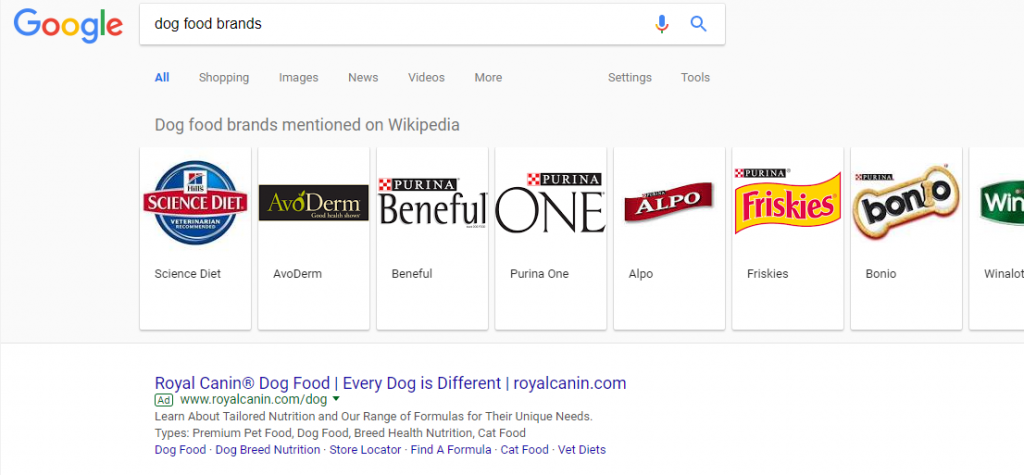
Many website owners complained about Google not mentioning where the carousel info was taken from so the switch is quite significant. Google added on April 11 a new featured to their carousel and is visible to both mobile and desktop end users.
source: seroundtable.com
When clicking on the carousel, it leads you not to the brand site but to the actual Wikipedia page of that brand or product.
How this Google update impacts you
It’s still not clear to what kind of searcher this carousel appears or in what country, yet one thing is clear. Big brands or websites that got featured in Wikipedia doubled their chances of appearing in Google SERPs.
What’s more, some searches trigger a featured snippet instead of a carousel, hence this is quite an intricate update.
14. New AdWords Features
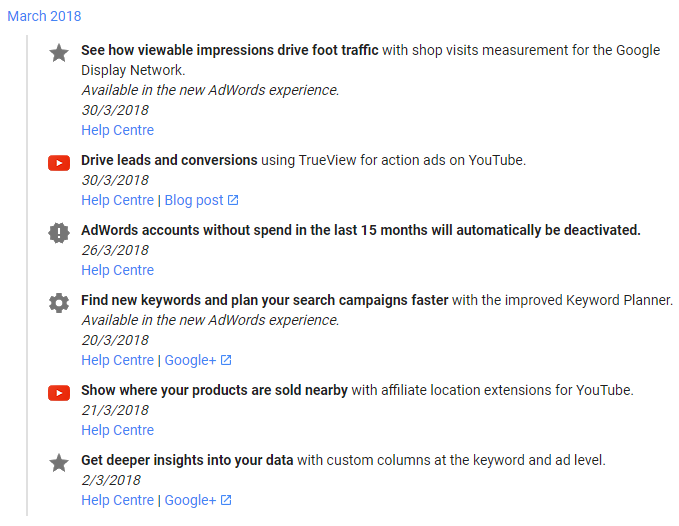
Starting early this year, Google added new AdWords featuresalmost every month: January, March, April, and May. In January, Google started allowing advertisers to add, edit, or remove keywords while they’re busy doing something else. Also, users have now the chance to quickly identify and name Display ads issues from the Overview page and find out more about every impression shift in search results. March had its fair share of new features, while April and May showed low activity with only one update each, April promising the chance of getting an insider look into keywords that aren’t showing ads together with an explanation, plus “get more done in less time”.
source: support.google.com
How this Google update impacts you
All these AdWords updates are meant to positively impact your advertising efforts and help you learn more from an environment you’re so much expecting results. Google’s aim is to allow you get deeper insight from your data in order to make the right selling decisions.
Conclusion
The updates that got launched so far in 2018 had to do a lot with user experience:
Google wanted pages to load fast (page speed), not have intrusive ads, lacking mobile optimization, and be relevant.
Even though, as Schwartz names them, many ranking fluctuations didn’t point out to a heavy or core update and were more some sort of “hiccups”, one thing is sure: Google is set to make their search engine as human as possible and as smart and cunning as a human being.
Every month, there has been a lot of chatter, debate, educated guesses in forums such as WebmasterWorld, Black Hat Forums, Google forums, as proved by the tools that monitor Google’s changes that mainly affect traffic and rankings (cognitiveSEO, SERPmetrics, Mozcast, Advanced Web Ranking, Accuranker, Algaroo, RankRanger, SEMRush).
Overall, we can expect more from Google as the time passes. Should you want to be ready for the upcoming updates or just fix your websites as much as you can for the ones that come into effect this July – page speed update and switching from HTTP to HTPPS -, make sure you read this post.
Google has one love and one heart: their users, and that’s why they’ll continue focusing on mobile that’s on the rise lately, improved user experience (UX), and richer and more relevant content experiences.
User experience will continue to be in the spotlight and more specifically will be driving users to spend less time in the search results and more time on websites with the richest content experiences.
Google is testing a new carousel style feature to local packs for resorts and hotels. In addition to the usual information, it has added an additional carousel before the listings. Dr. Pete Meyers spotted the test. Here is what it looks like: As you can see in the screenshot, there are new buttons in a […]
What You Can Learn From the 31 Days to Build a Better Blog Course
From a blog post series to an eBook and now a course, 31 Days to Build a Better Blog has certainly evolved. And in doing so it has helped many people. Today’s episode is based on information about the course.
I created the course, which is a combination of repurposed teaching from places on ProBlogger and the blog post series, to:
offer teaching that inspired action
help people develop good habits
give them a variety of things to try.
The goal is to give you 31 modules that each contain teaching, a challenge, and further reading using a combination of videos, audio files, printable worksheets and links.
There’s also a private Facebook group just for the students in the course to share what they’re doing and interact with each other on their journey.
Frequently Asked Questions (FAQs):
Who is it for? Those who already have a blog; beginners to advanced bloggers; and groups.
Does it have to be done daily? No, it can be done at your own pace.
How much work is it? It varies depending on the stage you’re at; it usually takes 1–5 hours a week.
Tips for Taking the Course:
Regularity is key
Be accountable
Take action
We’re extending the Early Bird price of $ 49 until the end of June. When it turns midnight (Pacific time) on June 30, the price goes up to $ 99. So if you’re interested, sign up now.
Links and Resources for I Guarantee This Will Improve Your Blog:
Full TranscriptExpand to view full transcriptCompress to smaller transcript view
Hi there and welcome to episode 253 of the ProBlogger Podcast. My name’s Darren Rowse, and I’m the blogger behind problogger.com, a blog, podcast event, job board, series of ebooks, and courses all designed to help you to start an amazing blog that will hopefully change the world, change the lives of your readers, but also change your life as well both through the blogging experience which can bring you a lot of joy and ideas. Help you to develop your ideas, but also hopefully will become a profitable thing as well, that’s what we teach over at problogger.com.
Today’s show notes are at problogger.com/podcast/253 that’s number 253. In this week’s episode, I want to touch base with you about our 31 Days to Build a Better Blog course, which I have mentioned a few times in passing over the last month or so. I’ve been talking about how it was coming and then last week, I mentioned that it was live and I had a number of you give me feedback that you needed a little bit more time to make a purchase.
A couple of things I want to let you know, firstly we’re going to extend the early bird discount a little bit until the end of the month but I also wanted to answer some of the questions today that we’ve had about the course and also talk a little bit about the backstory of the course as well. I want to talk today about why I first came out with 31 Days to Build a Better Blog, how it has evolved, and particularly this last step in the evolution to bring it into a course rather than an ebook.
I want to talk a little bit about why I think this format has helped so many people. I hope you find that interesting for those of you who want to build a course, or a product as well. We’re going to talk about what’s in it, who it’s best suited for, and I want to answer some of those frequently asked questions about who it is for, how much work is involved, and then also want to give you a few tips on taking this course as well. For those of you who’ve already purchased and there’s quite a few of you who are already enrolled in the course as well.
If you’ve been wondering about whether this course is right for you, 31 Days to Build a Better Blog, or if you’re just interested in the back story, and journey of creating a product like this, I hope you find this week’s episode useful to you. It is worth mentioning we are extending this early bird bonus until the end of June, so midnight Pacific Time, on 30th of June this year 2018, the price will go up from $ 49 US to $ 99 US.
You’ve got a 50% discount to get in early, and there’s one little condition on that, we do want your feedback on that. We’re sort of considering you as early bids as well so we want to gather as much information as we can from you on how we can improve that course. We’ve already been improving it from our early testers but we like to hear from you as well. If you do want that early access through the course, make sure you head to problogger.com/31days. It will also be linked in the show notes.
The reason we are extending the price is for two reasons, really. One, to allow those of you who need a little bit of time to get that money together. I know a $ 49 now for some of you isn’t that much money but for others of you, it is a big deal, and you need that little bit of late time to grab that together, so we wanted to extend that to make it as accessible as possible, and also we’ve had a few server upgrades going on at the moment. There have been a few brief periods over last the week because our resources area has been down and we got a few emails from people saying that you’ve been trying to access it. We just want to make sure everyone gets access to that by the 30th of June. Let’s get into today’s show.
The first question that I have had from a number of people is about the journey of 31 days. I know some of you are familiar with where 31 Days to Build a Better Blog came from. It really came from, I think it was back 2007 or 2006 even, where I came up with this idea for a 31-day blog post series. The reasons that I first ran that first series is that, I noticed that the things that really improved a blog, and the things that I’ve noticed in the journeys of other full time bloggers that I’ve met was that the secrets really were around, people were taking small consistent actions over time.
In fact, the small consistent actions that they were doing, writing a new blog post, responding to comments, these basic things were actually more important than almost anything else. It was really habit forming, that was the big thing that I noticed that really escalated the growth of a blog. Setting up routines, getting into the flow of creating content, getting into the flow of interacting with your audience, having an editorial calendar, and experimenting with different types of content. What I realized is that while still a lot of people were coming to ProBlogger, looking for the secret sauce, or the secret technique, those things can be interesting, and they can be fun, but what really was growing blogs was the small consistent actions, and habit forming, and doing was more important than knowing.
A lot of people came looking for the secrets of making money blogging at ProBlogger, but really, what I learned in the early days of ProBlogger was that, what seem to help bloggers the most was when I challenge them to take action rather than just to gain knowledge. I wanted to create this 31-day blog post series that was a little bit of teaching every day, a little bit of knowledge sharing, but was more based around challenging readers to take action.
I came up with this idea, by the end of the month I want you to have taken 31 actions. I did this blog post series and it went viral. It went crazy, bloggers from around the world, thousands and thousands of them took this challenge that I put out there over a month. By the end of the month, I was getting feedback from readers saying, “My traffic doubled this month.” Or “I’ve had more comments this month than I’ve ever had before.” Suddenly, I know what I’m doing with my blog. I’ve got a vision for my blog and I started getting these feedbacks from people that they really saw a lot of benefit from the learning but more importantly the doing.
I ran this series of blog post three times over a number of years, and every time I did this series, I updated it, I added more depth, I tweaked the challenges because over the years, blogging has changed and some of the things in that first challenge really didn’t relate three years later when I did it again. I tweaked it every year, and in the last year, I think it was 2009 or 2010, I turned it into an ebook, and that was based upon readers saying, “Hey, we know it’s all on the blog already for free, but we want it in the one kind of place where we can keep coming back to it. We want to be able to print it out, we want to be able to keep coming back to it, and doing it again, and again.” Because it was actually a 31-day process that you could do more than once.
I turned it into an ebook, not really sure whether anyone would buy the ebook, but very quickly found once I released it that it was a very popular product, and we sold tens of thousands of copies of that ebook in the year or so after I launched it. I updated it again in 2012 because as I said, things were changing in the blogosphere, and some of the challenges were becoming a little bit dated, so I came up with seven new challenges for the second edition.
Late last year, we realized, well 2012 when we did the second edition was quite a long time ago, six years have passed and again, things have been changing, and this product, this ebook needed to be updated again, and we began to ask ourselves, should we do it as an ebook? Should we do it as a course, or in some other format? We kind of landed on the idea all modernizing it, updating it, both in terms of the challenges. There are some new challenges in this one if you’ve taken it before, but also in terms of the delivery method.
I realized that a lot of people were benefiting from the podcast that I’ve been doing, and a lot of people preferred hearing and viewing content teaching. My team and I begin to put together this new version of 31-days to build a better blog as a course. The course is a combination of a number of things, some of it is repurposed, you all have had little bits of it on that the podcast in the past. There’s some references and further reading to blog articles as well, there are some printable worksheets that we’ve put together for it. the idea is still the same, every day or every module I should say, you’ll get a bit of teaching, and then most importantly, you’ll get a challenge to go away and do, and you also get a little bit of further reading as well, and to actually share what you’re doing in our Facebook group as well.
This has involved since the early versions of the ebook, some of the challenges are still the same activity but we’ve added depth, we’ve added some further reading, we’ve added some more suggestions, so it is a deep and different experience to those of you who have had the ebook before. Every module, you get a video presentation and you can also download that as an audio file if you prefer just to listen while you’re out on your walk, you get printable worksheets, and also some links to some further reading, and some for that listening as well. There’s also a private Facebook group just for course students where you can share what you’re doing, and interact with other students on the journey.
A few other commonly asked questions that we have been getting about this, the number one is who is it for? ProBlogger listeners span the whole breath of experience. we’ve got people listening to this podcast right now who have not even started a blog, we’ve got others who have started a blog in the first month, and then others who three or four years in, and then others who listen to this who are 10, 12, 15 years in the blogging as well. So who is this course designed for?
We’ve actually designed it for a number of groups, probably not everyone in that spectrum. Particularly those who are just starting out, so those of you who have a blog, and I need to emphasize that if you haven’t yet got a blog, this course isn’t for you. I would highly recommend you go back and start out, start a blog course, which is a free course that you can also find on ProBlogger. This course, 31 Days to Build a Better Blog is much better for those of you who have just started a blog, that’s one of the groups that I think it’s ideal for. If you’ve done the start a blog course, this is designed almost to take you on your next steps.
We kind of almost toyed with the idea of calling this your first 31 days of blogging. We didn’t do that because I think it also is relevant for those of you who are a bit further along the journey as well. If you’re just starting out, this is a great course to follow on. It’s a good companion course if you like to start a blog course. Number two group that this is ideal for is anyone who’s got an intermediate kind of level of blogging but maybe your blog needs a kick start in some way. I can relate to this, it’s been periods in my own blogging even in the last few years where I’ve kind of just needed a burst of something to really kick start the blog again.
I spoke with one blogger this morning who is loving doing the course. She’s been blogging now for four or five years, but her bloggers hit a plateau. It grew and grew, she’s a full time blogger but it’s just been slowing, and whining a little bit, and she realized that some of that was because of her, some of that was because she was a bit bored with blogging. She needed this kind of little injection of energy. She found 31 days as a good way to give her a framework I guess to be more intentional about her blog.
I also spoke with another blogger who is using 31 Days to Build a Better Blog to re-launch her blog. Her blog has been dormant for a couple of months because she’s had some other stuff going on in her life, and so she is using this course to help her kind of get it back up and going again, and to refocus it in some ways. I do know a few advanced bloggers who also have used the ebook version of 31 Days to Build a Better Blog as something to I guess give him that little injection of energy every now and again to give them a little bit of inspiration. The way we’ve designed this is that you can take it as 31 days in 31 days if you like and I’ll talk about the frequency of how you need to take it in a moment.
You can also come back to it again, and again, and one of the things I found really interesting, I was actually at a conference late last year, at a theme con and someone came out and said, “You know, I do 31 Days to Build a Better Blog every year.” And I was like, why do you do it every year? And they bought it in 2009, they’re doing the first version every year, and he said, that it was just something that he does every October, and October is the month that he does it, and he works through it and he’s found it really helpful to kind of just ask himself the questions around the daily challenges, and once he doesn’t learn a lot from it, the challenge of doing something in each of these 31 areas has been enough for him.
It may be useful for those of you who are more at that advanced end, but we have designed it more for beginner bloggers and intermediate bloggers particularly, and that’s who we’ve seen getting the most value out of it. The other thing I mentioned is that it is also ideal for bloggers who want to do it together, there is a group, a very small group of fashion bloggers, we’re going through it together right now, I’ve had an email from one of those this morning. It’s just a little Facebook group of five fashion bloggers, and they’ve all enrolled in the course together. That’s something that I’ve seen in the past that has worked quite well, bloggers within a niche doing it together, or even bloggers outside of a niche.
There’s a couple of Facebook groups around who have taken the ebook version together in the past. That’s one of the things I actually have noticed, and we’ll talk about this in a moment, when you do this together, when you have that accountability, it can really help to accentuate the good things that come out of it in some ways. The second most common question that I get asked is, does it have to be done daily? Absolutely not. Whilst we’ve certainly called it 31 Days to Build a Better Blog, that was because the first blog post series was rolled out on a daily basis.
We’ve actually designed this course version to be taken at your own pace. We actually ran this course with about 100 beta testers a few months ago, and we’ve surveyed them, and most of the responses that came back is that they took it, or they’re expecting to take it over two to three months. So it seems like the average is that people are working through a module every two to three days instead of a daily basis. That’s possibly because we’ve added a little bit more depth into this version of the course. Also, we’ve all got plenty of other things going on in our lives, and really to take this course, you need to put aside a little bit of time for learning, to listen to, and watch the video presentation, and work on the worksheets, but then you also need to put aside a little bit of time for doing the activity, and some of the activities do take a little bit more time than others.
Which leads me to the third question I get asked is, how much work does it take? Let me just say though, I do know bloggers who have taken this course faster than 31 days. If you do have a lot of time in your hands at the moment, maybe you are having a mid semester break at college, or university, or maybe you’ve got a couple weeks of work, you probably could do the whole lot in a couple of weeks if you really pushed hard, but most people do seem to be taking it at a slower pace. I know a number of people who are even doing it one module per week, and they got a list of to do after 31 weeks.
That next question, how much work is it? That’s an interesting one, there’s no one answer to this. We’ve designed the module so that you can consume each module in terms of the teaching of the module in less than an hour, some of them are less than that, some of them are kind of pushed right up to the A mark. As I mentioned a few times, you’re not going to get a lot of benefit out of this course if you just do the learning parts of it, you really need to turn that into action.
Every day, we do give you a challenge, and in a couple of days, we give you a couple of things to do as well. This will vary a bit, depending on the day. Some of the days take a little bit more work than others, some of the days, you probably could do in an hour, so the learning might be half an hour, the doing might be another hour. Some of the days, you might actually need to put aside a few hours as well. It will also vary a little bit as to whether you’re a beginner blogger or a more intermediate blogger because some of the things you’ll find, if you’re an intermediate blogger, you might have already done some of the challenges, and so, you may be able to use that day more to evaluate how you’re going.
For example, day 19 is about email newsletters, and so, for those of you just starting out, the challenge is to start an email newsletter. You’re going to have a bit of work to do, we’ll give you some tips on things to think about in doing that. Now, if you’ve already got a newsletter, you don’t need to do some of that work, but you could use that day to evaluate how your newsletter has already gone. that might take less time, so it will vary from person to person, most of those who are already doing the course, again, we survey them, and most of them are saying they’re spending between one and five hours a week on the course.
Again, it’s designed for you to take at your own pace. If you don’t have five hours a week, you could just slow the pace down a little bit and work through it, and move on to the next module when you are finished. We do have some emails that will go out during the process just to prompt you to keep moving for the course, we want to keep people moving through because we know the people who get the most value are the ones who complete it but really, you are able to take this completely at your own pace.
Lastly, I want to just give you a few tips for those of you who are thinking about doing the course, those of you who are already signed up, the number one thing that I found in talking to a lot of students of 31 Days to Build a Better Blog is the people who do get to the end, the people who do get the most benefit are the people who seem to send a scheduled time to do it. I’ve been guilty of this, I’ve signed up for courses, I’ve taken ebooks, and I think to myself, well, I’m going to do that course one day when I get time, and I know that when I take that attitude with any kind of teaching, whether that be a formal learning qualification at a university or something else, like an ebook, or a course online, I don’t tend to move through it. I don’t tend to finish it unless I’ve scheduled time for it.
I would highly recommend that you put in your diary a little bit of time every day, or a limited time every week, depending on your schedule but actually, put aside time to do it. Like I say, don’t just put aside time to learn, put aside time to do, that’s really important. The second thing I’ve noticed is that the people who seem to get the most out of this have accountability. Whether you are going to use our Facebook group for that, there’s a private Facebook group, or whether you’re going to take a buddy through the course, or do it as a group, or whether you’ve just got an offline friend who knows nothing about blogging who you ask to keep you accountable, I really encourage you to find some way of keeping accountable to keep you moving through this course, and to keep you taking action, and that’s the most important thing again and again.
Which leads me to the last tip, the people who get the most out of this really do take action, the temptation is just to listen, just to learn, and then to put the doing aside for one day. As we all know, one day tends not to happen, and it leads to regret later on. Schedule time to learn, but also schedule time to do, and that’s really important.
The last thing I will say is that we do have a 60-day guarantee on this product. We always have had guarantees, money back guarantees on all of our products. Personally, I would much rather have you as a happy, ongoing reader or listener, than having your $ 49—$ 49 will be great, that helps me to sustain ProBlogger to keep the podcast running, to pay my team, and fund my life and my children’s life as well.
I much prefer to have an ongoing relationship with you as a listener, as a reader, than having your $ 49. Feel free to take advantage of that guarantee, to enroll, start interacting with the course, find out whether it’s for you or not, if it’s not quite for you, contact our support team and they will arrange a full refund for you, no questions asked.
Do feel free to take advantage of that, and lastly, I really would love your feedback on how we can improve it if you’ve already taken the course, let our team know, just send our team an email via our contact form, or send it to help@problogger.com and let us know how we can improve that course as well.
Lastly, remember the early bird price is $ 49 US, that’s 50% off, but that will go up on the 1st of July midnight, on the 30th of June. Again, go to problogger.com/31days for the link and more information on what’s included.
I hope that answers all your questions, if you do have more questions on 31 days, any aspect of it, please shoot our team an email, help@problogger.com or you can shoot us an email via social media or in our Facebook group as well. thank you for listening today, we look forward to chatting with you next week in episode 254, and I look forward to seeing some of you in the 31 Days to Build a Better Blog Facebook group as well. Thanks for listening, chat next week.
You’ve been listening to ProBlogger. If you’d like to comment on any of today’s topics or subscribe to the series, find us at problogger.com/podcast. Tweet us @problogger. Find us at facebook.com/problogger or search ProBlogger on iTunes.
This episode of the ProBlogger podcast was edited by the team at PodcastMotor who offer a great range of services including helping you to setup and launch your podcast as well as ongoing editing and production of the podcast that you produce. You can check them out at podcastmotor.com.
How did you go with today’s episode?
Enjoy this podcast? Sign up to our ProBloggerPLUS newsletter to get notified of all new tutorials and podcasts.

.png)
.png)
.png)